
Data Center
Manage the data powering Prescient
The Data Center centralizes the data that powers Prescient. From here, you can set up and manage your data connections, monitor connector health, and organize campaigns for modeling and reporting. Keeping this information current helps ensure accurate attribution and forecasting.
How this fits together
%%{init: {"theme":"base","flowchart":{"curve":"basis","nodeSpacing":50,"rankSpacing":68,"padding":12},"themeVariables":{"fontSize":"14px","primaryColor":"#ffffff","primaryTextColor":"#111111","primaryBorderColor":"#d4d4d4","lineColor":"#8a8a8a","textColor":"#111111","edgeLabelBackground":"#ffffff","clusterBkg":"#fafafa","clusterBorder":"#ebebeb"}}}%%
flowchart LR
  DC("<b>Data Center</b><br/>connectors · channels · tactics") --> MC("<b>Model Center</b><br/>are the models trustworthy?")
  MC --> ATT("<b>Attribution</b><br/>what your media did")
  MC --> MF("<b>Media Forecaster</b><br/>what to do next")
  AI("<b>Prescient AI</b><br/>ask across all of it") -.-> ATT
  AI -.-> MF
  MF --> EX("<b>You execute</b><br/>in your ad platforms")
  EX --> DC
  classDef here fill:#111111,stroke:#111111,stroke-width:1.5px,color:#ffffff
  classDef accent fill:#f1fcf5,stroke:#1fd25a,stroke-width:1.5px,color:#111111
  classDef choice fill:#fafafa,stroke:#c9c9c9,stroke-width:1.5px,color:#5a5a5a
  class DC here
  linkStyle default stroke:#8a8a8a,stroke-width:2px
From a connector to a model
%%{init: {"theme":"base","flowchart":{"curve":"basis","nodeSpacing":50,"rankSpacing":68,"padding":12},"themeVariables":{"fontSize":"14px","primaryColor":"#ffffff","primaryTextColor":"#111111","primaryBorderColor":"#d4d4d4","lineColor":"#8a8a8a","textColor":"#111111","edgeLabelBackground":"#ffffff","clusterBkg":"#fafafa","clusterBorder":"#ebebeb"}}}%%
flowchart LR
  I("<b>Integrations</b><br/>connect a platform") --> CH("<b>Channels</b><br/>what the spend is")
  CH --> TA("<b>Tactics</b><br/>how you group it")
  TA --> MO("<b>Models</b><br/>trained on the result")
  MO --> OUT("<b>Attribution · Media Forecaster</b><br/>Prescient AI")
  I -.->|"stops delivering"| FR("<b>Data Freshness</b><br/>flags it")
  classDef here fill:#111111,stroke:#111111,stroke-width:1.5px,color:#ffffff
  classDef accent fill:#f1fcf5,stroke:#1fd25a,stroke-width:1.5px,color:#111111
  classDef choice fill:#fafafa,stroke:#c9c9c9,stroke-width:1.5px,color:#5a5a5a
  class MO accent
  linkStyle default stroke:#8a8a8a,stroke-width:2px
Find your way around
Connect and organise
Integrations · Channels · Tactics
Keep it healthy
Data freshness · Best practices
Integrations
The Integrations tab shows the systems Prescient reads from and writes to.
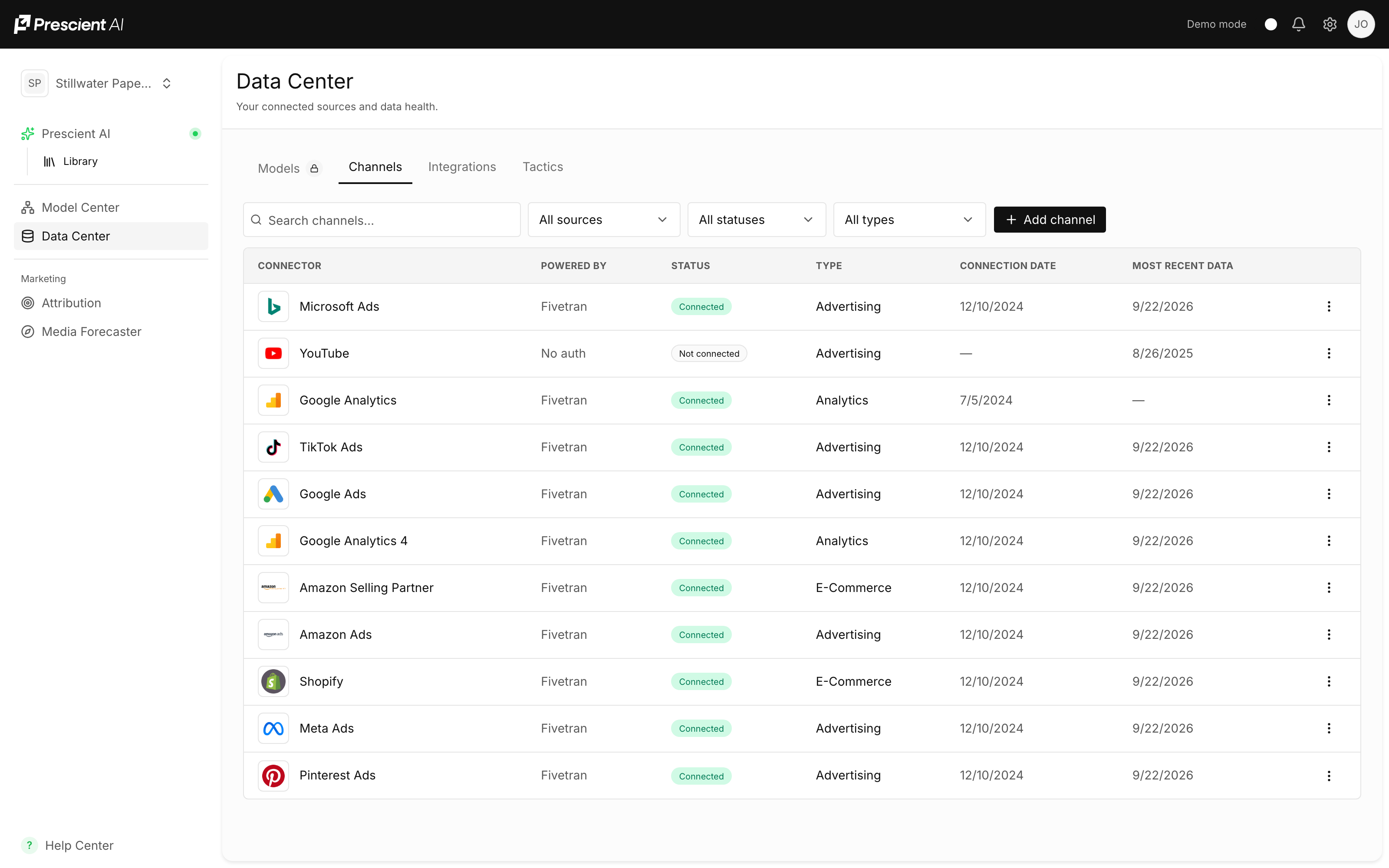
These provide information used by your models, such as:
- BigQuery
- Snowflake
- Fivetran
- Ecommerce platforms
- Advertising platforms
- Analytics systems
Each integration displays its current status. Select an integration to review its credentials or connection details.
Data Freshness
Prescient shows you when a connected source has stopped delivering current data, so
a quiet feed does not turn into a quietly wrong number.
A connector can be connected and healthy and still be behind — the
authorization works, the sync runs, but the platform has not delivered recent data.
Those are different problems with the same appearance from the outside, which is
why Prescient reports freshness separately from connection status.
| State | What it means | What to do |
|---|---|---|
| Up to date | The source has delivered data through the expected period | Nothing |
| Behind | The connection works, but recent data has not arrived | Check the platform for delivery or reporting delays |
| Connection issue | The connection itself needs attention | Reconnect the integration |
Reporting lag is normal for some platforms. A source that is a day or two behind
is usually delivering on its own schedule, not broken. Prescient flags a source when
it falls behind far enough to affect what you are reading.
Why it matters for your numbers
Recent periods firm up as data arrives. A source that is behind makes the most
recent days look weaker than they are — not because performance dropped, but
because the data has not landed yet. Checking freshness before reacting to a sudden
dip in the last few days is worth the ten seconds.
Channels
The Connectors tab shows the individual data feeds powering your models.
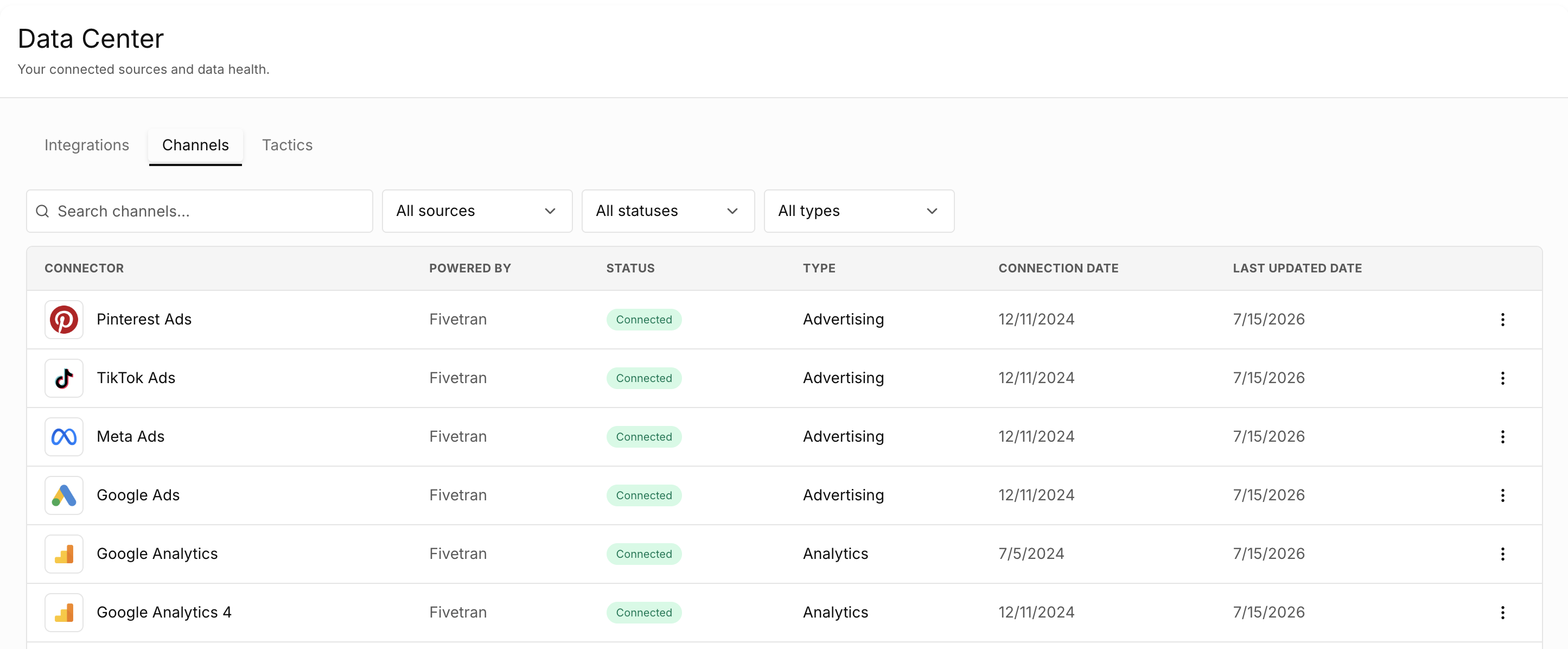
Connectors may include:
- Advertising platforms
- Ecommerce stores
- Retailers and marketplaces
- Analytics platforms
- Retail media sources
- Media vendors
For each connector, you can review its type, current status, last successful sync, available historical data, and connection date.
An Active status means Prescient is successfully receiving data. Review any warning or error status to prevent gaps from affecting your models and forecasts.
Tactics
The tactics tab organizes campaigns into the appropriate modeling groups.
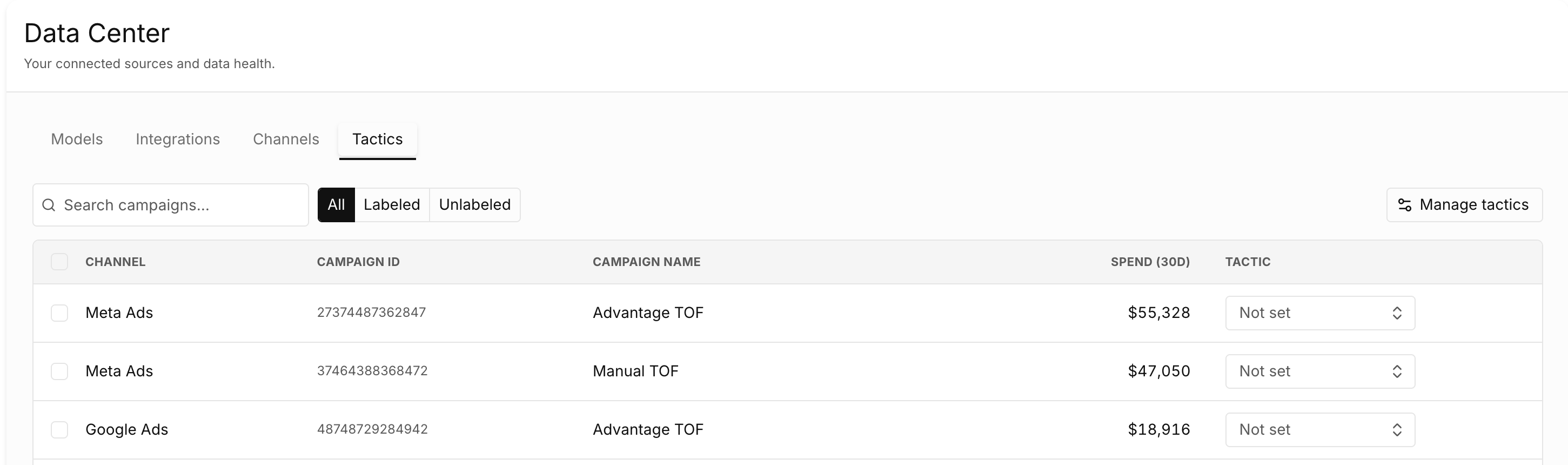
You can review:
- Labeled campaigns
- Unlabeled campaigns
- Channel
- Campaign name and ID
- Historical spend
- Assigned tactic
Review newly imported or renamed campaigns regularly to make sure they remain properly classified.
Best Practices
- Keep all material revenue and media sources connected.
- Resolve connector errors quickly.
- Add major promotions and business events before model reviews.
- Check for unmapped campaigns after launching new media.
- Contact your Prescient team before removing or replacing a historical data source.
Updated 8 days ago